Baby Groovy: The Cool, Vintage-Style Display Font
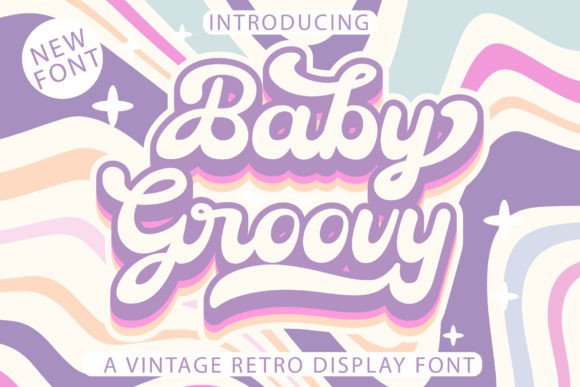
There’s a certain charm to designs that feel both nostalgic and fresh, a sweet spot where retro appeal meets contemporary cool. This is precisely the territory Baby Groovy occupies. It’s not just another typeface; it’s a statement piece, a premium font designed to inject instant personality and a distinct vintage flair into your creative projects. Think of it as the typographic equivalent of a perfectly worn-in leather jacket or a classic vinyl record cover—it carries history and style effortlessly.
At its core, Baby Groovy is a display font, meaning it’s crafted for impact at larger sizes. Its visual character is defined by soft, rounded edges, a slightly condensed form, and subtle quirks that evoke the optimistic, playful aesthetics of the 1960s and 70s. It’s friendly without being childish, retro without feeling dated. This unique typeface balances legibility with a strong stylistic voice, making it a versatile creative font for headlines, logos, and any text element that needs to command attention and set a mood.
Where Does This Groovy Typeface Shine?
The true test of any design asset is its practical application. Baby Groovy excels in projects where you want to establish a strong, approachable, and memorable brand identity. Its inherent warmth makes it a superb choice for logo design for boutique brands, cafes, record shops, or any business that wants to convey authenticity and a laid-back vibe. It translates beautifully onto physical products, from packaging design for artisanal goods to labels for craft beverages, where its vintage feel adds a layer of perceived quality and care.
Beyond branding, this display font is a powerhouse for editorial design and social media graphics. Imagine the masthead of a retro-themed magazine, the chapter headings in a cookbook, or the bold titles on a series of Instagram posts for a vintage clothing store. Baby Groovy grabs the eye and sets a cohesive tone instantly. For web design, it’s best used for hero text, navigation labels, or call-to-action buttons where its personality can shine without compromising overall site readability. It’s also a favorite for wedding designs, stationery, and event invitations, offering a sweet, personalized alternative to more formal script fonts.
The Practical Side: Using Baby Groovy Effectively
Choosing a font is more than just picking one you like; it’s about finding the right tool for the job. When considering Baby Groovy, start by evaluating your project’s core message. Is it fun, nostalgic, creative, or community-oriented? If yes, you’re on the right track. Its strength lies in its ability to convey a specific personality, so it might not be the best fit for a law firm’s annual report, but it’s perfect for a music festival poster or a indie game’s title screen.
A crucial step is testing font pairing. Baby Groovy’s distinct character means it needs a partner that complements rather than competes. Pair it with a clean, neutral sans serif font like Helvetica or Open Sans for body text to ensure readability. For a more harmonious retro look, you could pair it with a simple serif font. Avoid combining it with another strong script font or an overly ornate handwritten font, as this can create visual clutter. Always test your pairings in context—see how they look in a mockup of your actual project.
As a commercial font, it’s important to understand the licensing. Baby Groovy is typically sold with a license that covers a wide range of uses, from digital to print, for both personal and commercial projects. Always review the specific license details from the foundry or marketplace where you purchase it to ensure your intended use is covered. One of its most practical features is being PUA encoded. This means all the special characters, alternate glyphs, and stylistic swashes are easily accessible through your computer’s character map or the glyph panel in design software like Adobe Illustrator or Photoshop. This gives you immense creative control to customize letterforms and add extra flair to your headlines or logos without needing advanced software skills.
Finally, always prioritize readability. While Baby Groovy is designed to be legible, its vintage style means it performs best at larger sizes. Use it for headlines, subheadings, and short blocks of text. For longer paragraphs or smaller on-screen text, revert to your paired, more neutral font. By understanding its strengths and using it thoughtfully, Baby Groovy becomes more than just a cool font—it becomes a reliable tool for crafting designs that feel genuinely authentic and engaging.